Appearance
认识事件(Event)
Web 页面经常需要和用户之间进行交互,而交互的过程中我们可能想要捕捉这个交互的过程:
比如用户点击了某个按钮、用户在输入框里面输入了某个文本、用户鼠标经过了某个位置;
浏览器需要搭建一条 JavaScript 代码和事件之间的桥梁;
当某个事件发生时,让 JavaScript 执行某个函数,所以我们需要针对事件编写处理程序(handler);
原生事件监听方法:
事件监听方式一:在 script 中直接监听(很少使用)。
事件监听方式二:DOM 属性,通过元素的 on 来监听事件。
事件监听方式三:通过 EventTarget 中的 addEventListener 来监听。
jQuery 事件监听方法:
事件监听方式一:直接调用 jQuery 对象中的事件处理函数来监听,例如:click,mouseenter....。
事件监听方式二:调用 jQuery 对象中的 on 函数来监听,使用 off 函数来取消监听。
html
<!DOCTYPE html>
<html lang="en">
  <head>
    <meta charset="UTF-8" />
    <meta http-equiv="X-UA-Compatible" content="IE=edge" />
    <meta name="viewport" content="width=device-width, initial-scale=1.0" />
    <title>Document</title>
  </head>
  <body>
    <ul id="list" class="panel">
      <li class="li-1">li-1</li>
      <li class="li-2">li-2</li>
      <li class="li-3">li-3</li>
      <li class="li-4">li-4</li>
      <li class="li-5">li-5</li>
    </ul>

    <button class="cancel">取消事件的监听</button>

    <script src="../libs/jquery-3.6.0.js"></script>
    <script>
      // 1.监听文档完全解析完成
      $(function () {
        // 监听事件
        // 1.使用on来监听事件
        $("ul").on("click", function () {
          console.log("click1");
        });

        // 2.使用click来监听事件
        $("ul").click(function () {
          console.log("click2");
        });

        // 3.使用mouseenter来监听事件
        $("ul").mouseenter(function () {
          console.log("mouseenter");
        });

        // 取消监听事件
        $(".cancel").click(function () {
          // $('ul').off() // 取消ul元素上所有的事件
          // $('ul').off('mouseenter')
          $("ul").off("click"); // 两个click都会取消
        });

        // 使用程序-自动触发事件
        // $('ul').trigger('click')  // 模拟用户点击了ul元素
        $("ul").trigger("mouseenter");
      });
    </script>
  </body>
</html>
click 和 on 的区别
click 和 on 的区别:
click 是 on 的简写。它们重复监听,不会出现覆盖情况,都支持事件委托,底层用的是 addEventListener。
如果 on 没有使用 selector 的话,那么和使用 click 是一样的。
on 函数可以接受一个 selector 参数,用于筛选 可触发事件 的后代元素。
on 函数支持给事件添加命名空间。
html
<!DOCTYPE html>
<html lang="en">
  <head>
    <meta charset="UTF-8" />
    <meta http-equiv="X-UA-Compatible" content="IE=edge" />
    <meta name="viewport" content="width=device-width, initial-scale=1.0" />
    <title>Document</title>
  </head>
  <body>
    <ul id="list" class="panel">
      <li class="li-1">li-1</li>
      <li class="li-2">li-2</li>
      <li class="li-3">li-3</li>
      <li class="li-4">li-4</li>
      <li class="li-5">li-5</li>
    </ul>

    <button class="cancel">取消事件的监听</button>

    <script src="../libs/jquery-3.6.0.js"></script>
    <script>
      // 1.监听文档完全解析完成
      $(function () {
        // 监听事件
        // 1.使用on来监听事件 ( 支持给事件添加命名空间: liujun )
        $("ul").on("click.liujun", function () {
          console.log("click1");
        });

        // 2.使用click来监听事件
        $("ul").click(function () {
          console.log("click2");
        });

        // 取消监听事件
        $(".cancel").click(function () {
          $("ul").off("click.liujun"); // 只取消了click1
        });

        /*
        1.on 监听的事件支持使用 命名空间
        2.on 函数支持一个 selector 的参数
      */
        //  $('ul').on('click', '字符串类型的选择器', function() {
        // 后面讲事件委托的时候再讲
        //  })
      });
    </script>
  </body>
</html>
click 和 on 中 this 指向
click 和 on 的 this 指向:
this 都是指向原生的 DOM Element
html
<!DOCTYPE html>
<html lang="en">
  <head>
    <meta charset="UTF-8" />
    <meta http-equiv="X-UA-Compatible" content="IE=edge" />
    <meta name="viewport" content="width=device-width, initial-scale=1.0" />
    <title>Document</title>
  </head>
  <body>
    <ul id="list" class="panel">
      <li class="li-1">li-1</li>
      <li class="li-2">li-2</li>
      <li class="li-3">li-3</li>
      <li class="li-4">li-4</li>
      <li class="li-5">li-5</li>
    </ul>

    <script src="../libs/jquery-3.6.0.js"></script>
    <script>
      // 1.监听文档完全解析完成
      $(function () {
        // $('ul').click(function() {
        //   console.log("%O", this) // DOM Element -> UL
        // })

        // $('ul').on('click', function() {
        //   console.log(this) // DOM Element -> UL
        // })

        // $('ul li').click(function() {
        //   console.log(this) // DOM Element -> UL
        // })

        // 底层实现的原理
        // var lisEl = $('ul li').get() // [li, li, li]
        // for(var liEL of lisEl ){
        //   liEL.addEventListener('click', function() {
        //     console.log(this)
        //   })
        // }

        // 如果this想使用jQuery里面的方法,可以转成$(this)
        // $('ul li').click(function() {
        //   console.log( $(this) ) // DOM Element 转成 jQuery 对象
        // })

        $("ul li").click(() => {
          console.log(this);
        });
      });
    </script>
  </body>
</html>
jQuery 的事件冒泡
我们会发现默认情况下事件是从最内层(如下图 span)向外依次传递的顺序,这个顺序我们称之为事件冒泡(Event Bubble);
事实上,还有另外一种监听事件流的方式就是从外层到内层(如:body -> span),这种称之为事件捕获(Event Capture);
为什么会产生两种不同的处理流呢?
这是因为早期在浏览器开发时,不管是 IE 还是 Netscape 公司都发现了这个问题;
但是他们采用了完全相反的事件流来对事件进行了传递;
IE<9 仅采用了事件冒泡的方式,Netscape 采用了事件捕获的方式;
IE9+和现在所有主流浏览器都已支持这两种方式。
jQuery 为了更好的兼容 IE 浏览器,底层并没有实现事件捕获。
html
<!DOCTYPE html>
<html lang="en">
  <head>
    <meta charset="UTF-8" />
    <meta http-equiv="X-UA-Compatible" content="IE=edge" />
    <meta name="viewport" content="width=device-width, initial-scale=1.0" />
    <title>Document</title>
    <style>
      .box {
        width: 200px;
        height: 200px;
        background-color: pink;
      }
      .content {
        display: inline-block;
        width: 50px;
        height: 50px;
        background-color: green;
      }
    </style>
  </head>
  <body>
    <div class="box">
      div
      <span class="content">span</span>
    </div>

    <script src="../libs/jquery-3.6.0.js"></script>
    <script>
      // 1.监听文档完全解析完成
      $(function () {
        // 1.事件冒泡
        // $('.content').click(function() {
        //   console.log('span')
        // })
        // $('.box').click(function() {
        //   console.log('div')
        // })
        // $('body').click(function() {
        //   console.log('body')
        // })

        // 2.事件冒泡
        $(".content").on("click", function () {
          console.log("span");
        });
        $(".box").on("click", function () {
          console.log("div");
        });
        $("body").on("click", function () {
          console.log("body");
        });
      });
    </script>
  </body>
</html>
jQuery 的事件对象( Event Object)
jQuery 事件系统的规范是根据 W3C 的标准来制定 jQuery 事件对象。原生事件对象的大多数属性都被复制到新的 jQuery 事件
对象上。如,以下原生的事件属性被复制到 jQuery 事件对象中:
altKey, clientX, clientY, currentTarget, data, detail, key, keyCode, offsetX, offsetY, originalTarget, pageX, pageY,
relatedTarget, screenX, screenY, target, ......
jQuery 事件对象通用的属性(以下属性已实现跨浏览器的兼容):
target、relatedTarget、pageX、pageY、which、metaKey
jQuery 事件对象常用的方法:
preventDefault() : 取消事件的默认行为(例如,a 标签、表单事件等)。
stopPropagation() : 阻止事件的进一步传递(例如,事件冒泡)。
要访问其它事件的属性,可以使用 event.originalEvent 获取原生对象。
html
<!DOCTYPE html>
<html lang="en">
  <head>
    <meta charset="UTF-8" />
    <meta http-equiv="X-UA-Compatible" content="IE=edge" />
    <meta name="viewport" content="width=device-width, initial-scale=1.0" />
    <title>Document</title>
    <style>
      .box {
        width: 200px;
        height: 200px;
        background-color: pink;
      }
      .content {
        display: inline-block;
        width: 50px;
        height: 50px;
        background-color: green;
      }
    </style>
  </head>
  <body>
    <div class="box">
      div
      <span class="content">span</span>
    </div>

    <script src="../libs/jquery-3.6.0.js"></script>
    <script>
      // 1.监听文档完全解析完成
      $(function () {
        // 1.获取原生的事件对象
        // var divEl = document.querySelector('.box')
        // divEl.addEventListener('click', function(event) {
        //   console.log(event)
        // })

        // 2.获取jQuery的事件对象
        $(".box").click(function ($event) {
          console.log($event); // 是jQuery的事件对象
          console.log($event.originalEvent); // 拿到原生的事件对象
        });
      });
    </script>
  </body>
</html>
html
<!DOCTYPE html>
<html lang="en">
  <head>
    <meta charset="UTF-8" />
    <meta http-equiv="X-UA-Compatible" content="IE=edge" />
    <meta name="viewport" content="width=device-width, initial-scale=1.0" />
    <title>Document</title>
    <style>
      .box {
        width: 200px;
        height: 200px;
        background-color: pink;
      }
      .content {
        display: inline-block;
        width: 50px;
        height: 50px;
        background-color: green;
      }
    </style>
  </head>
  <body>
    <div class="box">
      div
      <span class="content">span</span>
    </div>

    <a href="https://www.jd.com">京东商城</a>

    <script src="../libs/jquery-3.6.0.js"></script>
    <script>
      // 1.监听文档完全解析完成
      $(function () {
        $("a").click(function ($event) {
          $event.preventDefault(); // 阻止a元素的默认行为
          console.log("点击a元素");
        });

        $(".content").click(function ($event) {
          $event.stopPropagation(); // 阻止事件的冒泡
          console.log("span");
        });

        $(".box").on("click", function () {
          console.log("div");
        });
        $("body").on("click", function () {
          console.log("body");
        });
      });
    </script>
  </body>
</html>
jQuery 的事件委托(event delegation)
事件冒泡在某种情况下可以帮助我们实现强大的事件处理模式 –事件委托模式(也是一种设计模式)
那么这个模式是怎么样的呢?
因为当子元素被点击时,父元素可以通过冒泡监听到子元素的点击;
并且可以通过 event.target 获取到当前监听事件的元素(event.currentTarget 获取到的是处理事件的元素);
html
<!DOCTYPE html>
<html lang="en">
  <head>
    <meta charset="UTF-8" />
    <meta http-equiv="X-UA-Compatible" content="IE=edge" />
    <meta name="viewport" content="width=device-width, initial-scale=1.0" />
    <title>Document</title>
  </head>
  <body>
    <ul id="list" class="panel">
      <li class="li-1">
        li-1
        <p class="p1">我是p元素</p>
      </li>
      <li class="li-2">
        li-2
        <p class="p2">我是p元素</p>
      </li>
      <li class="li-3">
        li-3
        <p class="p3">我是p元素</p>
      </li>
      <li class="li-4">
        li-4
        <p class="p4">我是p元素</p>
      </li>
      <li class="li-5">
        li-5
        <p class="p5">我是p元素</p>
      </li>
    </ul>

    <script src="../libs/jquery-3.6.0.js"></script>
    <script>
      // 1.监听文档完全解析完成
      $(function () {
        // 事件的委托
        // $('ul').on('click', function(event) {
        //   console.log(event.target)  // DOM Element : ul li  p
        // })

        // 仅仅监听li中元素的点击事件( 筛选出 可触发事件的 后代元素 )
        // 只有点击p元素才会触发点击事件
        $("ul").on("click", "li p", function (event) {
          console.log(event.target); // DOM Element : ul li  p
        });

        // on vs click
      });
    </script>
  </body>
</html>
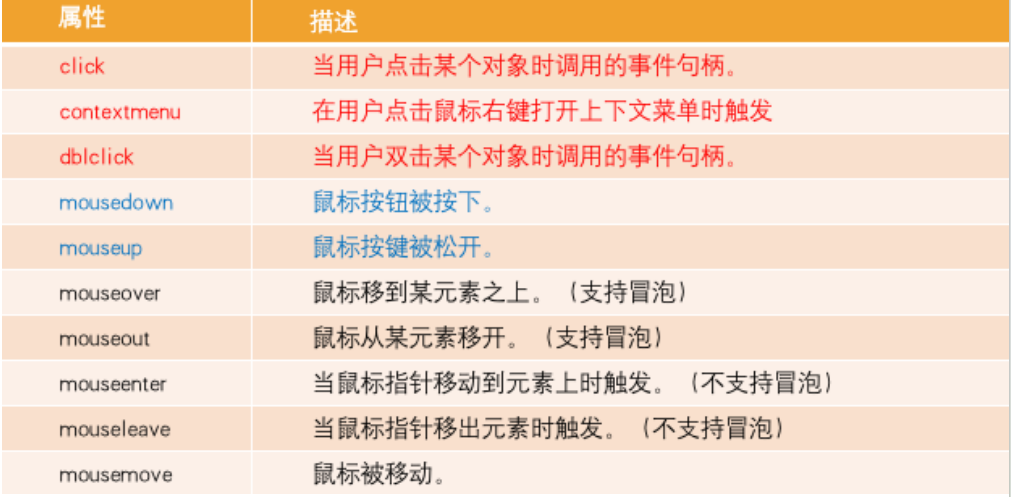
jQuery 常见的事件
鼠标事件(Mouse Events)
- .click() 、.dblclick()、.hover()、.mousedown() 、.mouseup()
- .mouseenter()、.mouseleave()、.mousemove()
- .mouseover()、.mouseout() 、.contextmenu()、.toggle()
键盘事件(Keyboard Events)
- .keydown() 、.keypress()、.keyup()
文档事件(Document Loading Events)
- load、ready()、.unload
表单事件(Form Events)
- .blur() 、.focus()、.change()、.submit()、.select()
浏览器事件(Browser Events)
- .resize()、.scroll()
html
<!DOCTYPE html>
<html lang="en">
  <head>
    <meta charset="UTF-8" />
    <meta http-equiv="X-UA-Compatible" content="IE=edge" />
    <meta name="viewport" content="width=device-width, initial-scale=1.0" />
    <title>Document</title>
  </head>
  <body>
    <ul id="list" class="panel">
      <li class="li-1">li-1</li>
      <li class="li-2">li-2</li>
      <li class="li-3">li-3</li>
      <li class="li-4">li-4</li>
      <li class="li-5">li-5</li>
    </ul>

    <input type="text" />

    <script src="../libs/jquery-3.6.0.js"></script>
    <script>
      // 1.监听文档完全解析完成
      $(function () {
        // on('hover', func)

        // 1.hover 底层使用的是: mouseenter or mouseleave
        // $('ul').hover(function() {
        //   console.log('鼠标悬浮在ul')
        // }, function() {
        //   console.log('鼠标离开在ul')
        // })

        // 2.监听浏览器resize事件 ( throttle 节流 )
        // on('resize', func)
        $(window).resize(function () {
          console.log("resize");
        });

        // 3.表单事件
        $("input").focus(function () {
          console.log("input focus事件");
        });
        $("input").blur(function () {
          console.log("input blur事件");
        });

        // input ( debounce 防抖操作 )
        $("input").on("input", function () {
          //  console.log( $('input').val() )
          console.log($(this).val());
        });
      });
    </script>
  </body>
</html>
mouseover 和 mouseenter 的区别
mouseenter()和 mouseleave()
不支持冒泡
进入子元素依然属于在该元素内,没有任何反应
mouseover()和 mouseout()
支持冒泡
进入元素的子元素时
- 先调用父元素的 mouseout
- 再调用子元素的 mouseover
- 因为支持冒泡,所以会将 mouseover 传递到父元素中;
jQuery 的键盘事件
事件的执行顺序是 keydown()、keypress()、keyup()
keydown 事件先发生;
keypress 发生在文本被输入;
keyup 发生在文本输入完成(抬起、松开);
我们可以通过 key 和 code 来区分按下的键:
code:“按键代码”("KeyA","ArrowLeft" 等),特定于键盘上按键的物理位置。
key:字符("A","a" 等),对于非字符(non-character)的按键,通常具有与 code 相同的值。)
jQuery 的表单事件
表单事件(Form Events)
.blur() - 元素失去焦点时触发
.focus() - 元素获取焦点时触发
change() - 该事件在表单元素的内容改变时触发( <input>, <keygen>, <select>, 和 <textarea>)
.submit() - 表单提交时触发
...
jQuery-选项卡切换

html
<!DOCTYPE html>
<html lang="en">
  <head>
    <meta charset="UTF-8" />
    <meta http-equiv="X-UA-Compatible" content="IE=edge" />
    <meta name="viewport" content="width=device-width, initial-scale=1.0" />
    <title>Document</title>
    <style>
      .nav {
        background-color: #43240c;
        color: white;
      }

      .nav-bar {
        display: flex;
        width: 1200px;
        height: 46px;
        line-height: 46px;
        margin: 0 auto;
      }

      .item {
        width: 160px;
        text-align: center;
        cursor: pointer;
      }
      .item.active {
        background-color: #fee44e;
        color: #43200c;
      }
    </style>
  </head>
  <body>
    <div class="nav">
      <div class="nav-bar">
        <div class="item active">首页</div>
        <div class="item">9块9包邮</div>
        <div class="item">超值大额券</div>
        <div class="item">降温急救穿搭</div>
      </div>
    </div>

    <script src="../libs/jquery-3.6.0.js"></script>
    <script>
      // 1.监听文档完全解析完成
      $(function () {
        // siblings找到所有兄弟元素
        $(".item").on("click", function () {
          $(this).addClass("active").siblings().removeClass("active");
        });

        // console.log($('.item:eq(1)').siblings())
      });
    </script>
  </body>
</html>
jQuery 动画操作-animate
.animate(): 执行一组 CSS 属性的自定义动画,允许支持数字的 CSS 属性上创建动画。
.animate( properties [, duration ] [, easing ] [, complete ] )
.animate( properties, options )
propertys 参数的支持:
- 数值:number 、string
- 关键字:'show'、'hide'和'toggle'
- 相对值:+= 、 -=
- 支持 em 、% 单位(可能会进行单位转换)
html
<!DOCTYPE html>
<html lang="en">
  <head>
    <meta charset="UTF-8" />
    <meta http-equiv="X-UA-Compatible" content="IE=edge" />
    <meta name="viewport" content="width=device-width, initial-scale=1.0" />
    <title>Document</title>
    <style>
      .box {
        width: 200px;
        height: 100px;
        background-color: pink;
      }
    </style>
  </head>
  <body>
    <button class="hide">隐藏</button>
    <button class="show">显示</button>

    <div class="box">box</div>

    <script src="../libs/jquery-3.6.0.js"></script>
    <script>
      // 1.监听文档完全解析完成
      $(function () {
        $(".hide").click(function () {
          // 需要一个隐藏的动画
          $(".box").animate(
            {
              height: 0, // 100px -> 0px
              width: 0, // 200px -> 0px
              opacity: 0, // 1 -> 0
            },
            2000,
            "swing",
            function () {
              console.log("动画执行完毕之后会回调");
            }
          );
        });

        $(".show").click(function () {
          $(".box").animate(
            {
              height: 100,
              width: 200,
              opacity: 1,
            },
            function () {
              console.log("动画执行完毕之后会回调");
            }
          );

          // $('.box').animate({
          //   height: 100,
          //   width: 200,
          //   opacity: 1
          // }, 2000, 'swing', function() {
          //   console.log('动画执行完毕之后会回调')
          // })

          // $('.box').animate({
          //   height: 100,
          //   width: 200,
          //   opacity: 1
          // }, {
          //   duration: 'slow',
          //   complete: function() {
          //     console.log('动画执行完毕之后会回调')
          //   }
          // })
        });
      });
    </script>
  </body>
</html>
html
<!DOCTYPE html>
<html lang="en">
  <head>
    <meta charset="UTF-8" />
    <meta http-equiv="X-UA-Compatible" content="IE=edge" />
    <meta name="viewport" content="width=device-width, initial-scale=1.0" />
    <title>Document</title>
    <style>
      body {
        height: 200px;
      }
      .box {
        width: 200px;
        height: 100px;
        background-color: pink;
      }
    </style>
  </head>
  <body>
    <button class="hide">隐藏</button>
    <button class="show">显示</button>
    <button class="toggle">切换</button>

    <div class="box">box</div>

    <script src="../libs/jquery-3.6.0.js"></script>
    <script>
      // 1.监听文档完全解析完成
      $(function () {
        // $('.hide').click(function() {
        //   // 需要一个隐藏的动画
        //   $('.box').animate({
        //     opacity: 'toggle',
        //     // height: 0,  // number
        //     // height: '0',  // string
        //     // height: '100%',  // 百分比  50% -> 100% ; 100px -> 200px
        //     // height: 'toggle' // 关键字: show  hide  toggle(切换)
        //     // height: '-=40px' // 100px -> 60px
        //   }, 4000, 'swing' , function() {
        //     console.log('动画执行完毕之后会回调')
        //   })
        // })

        $(".hide").click(function () {
          $(".box").animate(
            {
              opacity: 0,
              height: 0,
              width: 0,
            },
            "slow",
            function () {
              // number | 关键之: slow->600 fast->200
              console.log("动画执行完成");
            }
          );
        });
        $(".show").click(function () {
          $(".box").animate(
            {
              opacity: 1,
              height: 100,
              width: 200,
            },
            "fast",
            function () {
              console.log("动画执行完成");
            }
          );
        });
        $(".toggle").click(function () {
          $(".box").animate(
            {
              opacity: "toggle",
              height: "toggle",
              width: "toggle",
            },
            400,
            function () {
              console.log("动画执行完成");
            }
          );
        });
      });
    </script>
  </body>
</html>
jQuery 常见动画函数
显示和隐藏匹配的元素
.hide() 、.hide( [duration ] [, complete ] )、.hide( options ) - 隐藏元素
.show() 、.show( [duration ] [, complete ] )、.show( options ) - 显示元素
.toggle() 、.toggle( [duration ] [, complete ] )、.toggle( options ) -显示或者隐藏元素
html
<!DOCTYPE html>
<html lang="en">
  <head>
    <meta charset="UTF-8" />
    <meta http-equiv="X-UA-Compatible" content="IE=edge" />
    <meta name="viewport" content="width=device-width, initial-scale=1.0" />
    <title>Document</title>
    <style>
      body {
        height: 200px;
      }
      .box {
        width: 200px;
        height: 100px;
        background-color: pink;
      }
    </style>
  </head>
  <body>
    <button class="hide">隐藏</button>
    <button class="show">显示</button>
    <button class="toggle">切换</button>

    <div class="box">box</div>

    <script src="../libs/jquery-3.6.0.js"></script>
    <script>
      // 1.监听文档完全解析完成
      $(function () {
        $(".hide").click(function () {
          $(".box").hide("slow", function () {
            console.log("动画执行完成");
          });
        });

        $(".show").click(function () {
          $(".box").show("fast", function () {
            console.log("动画执行完成");
          });
        });

        $(".toggle").click(function () {
          // $('.box').toggle(2000)

          $(".box").toggle({
            duration: 3000,
            complete: function () {
              console.log("动画执行完成");
            },
          });
        });
      });
    </script>
  </body>
</html>
淡入淡出
.fadeIn()、.fadeIn( [duration ] [, complete ] )、.fadeIn( options ) - 淡入动画
.fadeOut()、.fadeOut( [duration ] [, complete ] )、.fadeOut( options ) -淡出动画
.fadeToggle()、.fadeToggle( [duration ] [, complete ] )、.fadeToggle( options ) - 淡入淡出的切换
.fadeTo( duration, opacity [, complete ] ) - 渐变到
jQuery 元素中的动画队列
jQuery 匹配元素中的 animate 和 delay 动画是通过一个动画队列(queue)来维护的。例如执行下面的动画都会添加到动画队列中:
- .hide() 、 .show()
- .fadeIn() 、.fadeOut()
- .animate()、delay()
- ...
.queue():查看当前选中元素中的动画队列。
.stop( [clearQueue ] [, jumpToEnd ] ):停止匹配元素上当前正在运行的动画。
clearQueue :一个布尔值,指是否也删除排队中的动画。默认为 false
jumpToEnd :一个布尔值,指是否立即完成当前动画。默认为 false
html
<!DOCTYPE html>
<html lang="en">
  <head>
    <meta charset="UTF-8" />
    <meta http-equiv="X-UA-Compatible" content="IE=edge" />
    <meta name="viewport" content="width=device-width, initial-scale=1.0" />
    <title>Document</title>
    <style>
      .box {
        position: relative;
        width: 100px;
        height: 100px;
        background-color: pink;
      }
    </style>
  </head>
  <body>
    <button class="start">开始动画</button>
    <button class="stop">停止动画</button>
    <button class="queue">查看动画队列</button>

    <div class="box">box</div>

    <script src="../libs/jquery-3.6.0.js"></script>
    <script>
      // 1.监听文档完全解析完成
      $(function () {
        var $box = $(".box");
        $(".start").click(function () {
          $box.animate(
            {
              top: 100,
            },
            5000
          );

          $box.animate(
            {
              left: 100,
            },
            5000
          );

          $box.animate(
            {
              top: 0,
            },
            5000
          );

          $box.animate(
            {
              left: 0,
            },
            5000
          );
        });

        $(".queue").click(function () {
          console.log($box.queue()); // 查看动画队列 fx
        });

        $(".stop").click(function () {
          // $box.stop()  // 停止 fx 动画队列( 停止当前执行的动画,还会继续执行动画队列中其它的动画 )
          // stop(false, false) 默认值
          // $box.stop(true) // 停止所有的动画, 清空了动画队列
          //  $box.stop(true, true) // 清空了动画队列, 立即执行完当前的动画
        });
      });
    </script>
  </body>
</html>
jQuery 实现-隐藏侧边栏广告
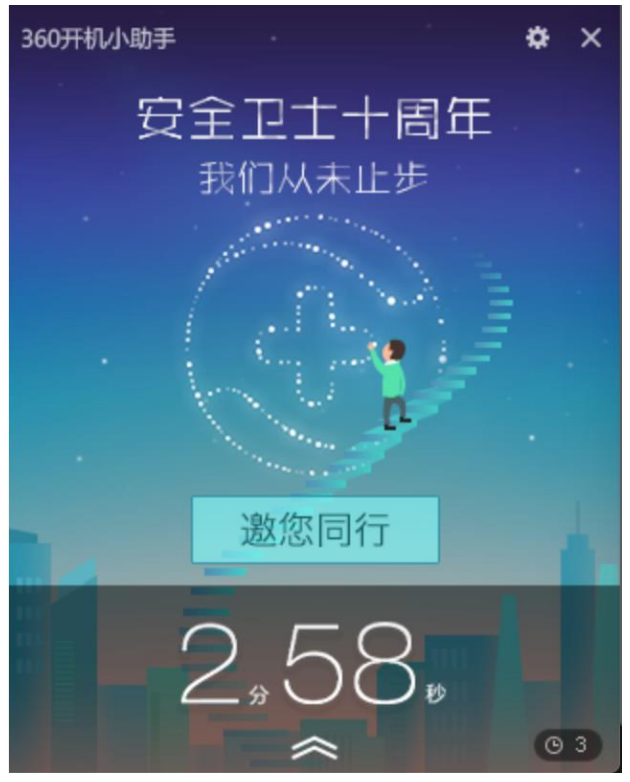
先把下面的阴影向下隐藏,再把上面的部分向右隐藏
html
<!DOCTYPE html>
<html lang="en">
  <head>
    <meta charset="UTF-8" />
    <meta http-equiv="X-UA-Compatible" content="IE=edge" />
    <meta name="viewport" content="width=device-width, initial-scale=1.0" />
    <title>Document</title>

    <style>
      .box {
        position: fixed;
        bottom: 0;
        right: 0;
      }
      img {
        vertical-align: bottom;
      }

      .close {
        position: absolute;
        top: 0;
        right: 0;
        width: 25px;
        height: 25px;
        cursor: pointer;
        /* border: 1px solid red; */
      }
    </style>
  </head>
  <body>
    <div class="box">
      <span class="close"></span>
      <div class="top">
        <img src="./images/top.png" alt="" />
      </div>
      <div class="bottom">
        <img src="./images/bottom.png" alt="" />
      </div>
    </div>
    <script src="../libs/jquery-3.6.0.js"></script>
    <script>
      // 1.监听文档完全解析完成
      $(function () {
        $(".close").click(function () {
          $(".bottom").animate({ height: 0 }, 600, function () {
            $(".box").animate({ width: 0 }, 600, function () {
              $(".box").css("display", "none");
            });
          });
        });
      });
    </script>
  </body>
</html>
jQuery 中的遍历
.each( function ): 遍历一个 jQuery 对象,为每个匹配的元素执行一个回调函数。
function 参数:
Function( Integer index, Element element ), 函数中返回 false 会终止循环。
jQuery.each( array | object , callback ) : 一个通用的迭代器函数,可以用来无缝地迭代对象和数组。
array 参数:支持数组(array)或者类数组(array-like),底层使用 for 循环 。
object 参数: 支持普通的对象 object 和 JSON 对象等,底层用 for in 循环。
function 参数:
Function( Integer index, Element element ), 函数中返回 false 会终止循环。
.each() 和 jQuery.each()函数的区别:
.each()是 jQuery 对象上的方法,用于遍历 jQuery 对象。
jQuery.each( ) 是 jQuery 函数上的方法,可以遍历对象、数组、类数组等,它是一个通用的工具函数。
html
<!DOCTYPE html>
<html lang="en">
  <head>
    <meta charset="UTF-8" />
    <meta http-equiv="X-UA-Compatible" content="IE=edge" />
    <meta name="viewport" content="width=device-width, initial-scale=1.0" />
    <title>Document</title>
  </head>
  <body>
    <ul id="list" class="panel">
      <li class="li-1">li-1</li>
      <li class="li-2">li-2</li>
      <li class="li-3">li-3</li>
      <li class="li-4">li-4</li>
      <li class="li-5">li-5</li>
    </ul>

    <script src="../libs/jquery-3.6.0.js"></script>
    <script>
      // 1.监听文档完全解析完成
      $(function () {
        // 1.遍历jQuery对象 ( 已经实现了迭代器协议 for of )
        // 对象中的 each 底层调用的 jQuery函数上的each方法
        $("ul li").each(function (index, element) {
          // [].forEach( func(element, index, array ))
          console.log(index, element);
        });

        console.log("%O", $("ul"));
        // 2.使用 for of
      });
    </script>
  </body>
</html>
html
<!DOCTYPE html>
<html lang="en">
  <head>
    <meta charset="UTF-8" />
    <meta http-equiv="X-UA-Compatible" content="IE=edge" />
    <meta name="viewport" content="width=device-width, initial-scale=1.0" />
    <title>Document</title>
  </head>
  <body>
    <ul id="list" class="panel">
      <li class="li-1">li-1</li>
      <li class="li-2">li-2</li>
      <li class="li-3">li-3</li>
      <li class="li-4">li-4</li>
      <li class="li-5">li-5</li>
    </ul>

    <script src="../libs/jquery-3.6.0.js"></script>
    <script>
      // 1.监听文档完全解析完成
      $(function () {
        // 1.遍历jQuery对象 ( 已经实现了迭代器协议 for of )
        jQuery.each($("ul li"), function (index, element) {
          console.log(index, element);
          return false;
        });
      });
    </script>
  </body>
</html>
jQuery 的 AJAX
在前端页面开发中,如果页面中的数据是需要动态获取或者更新的,这时我们需要向服务器发送异步的请求来获取数据,然后在无需刷新页面的情况来更新页面。那么这个发起异步请求获取数据来更新页面的技术叫做 AJAX。
AJAX 全称(Asynchronous JavaScript And XML),是异步的 JavaScript 和 XML,它描述了一组用于构建网站和 Web 应用程序的开发技术。
简单点说,就是使用 XMLHttpRequest 对象与服务器通信。它可以使用 JSON,XML,HTML 和 text 文本等格式发送和接收数据。
AJAX 最吸引人的就是它的“异步”特性。也就是说它可以在不重新刷新页面的情况下与服务器通信,交换数据,或更新页面。
AJAX 请求方法(Method)
GET、POST、PUT、PACTH、DELETE 等
jQuery 中也有 AJAX 模块,该模块是在*XMLHttpRequest 的基础上进行了封装,语法(Syntax)如下:
$.ajax( [settings ] ) - 默认用 GET 请求从服务器加载数据, 会返回 jQXHR 对象,可以利用该对象的 abort 方法来取消请求。
$.get( url [, data ] [, success ] [, dataType ] ) - 发起GET请求,底层调用的还是$ajax()
$.post( url [, data ] [, success ] [, dataType ] ) - 发起POST请求,底层调用的还是$ajax()
初体验 jQuery 中的 AJAX
https://httpbin.org (是一个专门提供:免费测试 http 服务的网站)
html
<!DOCTYPE html>
<html lang="en">
  <head>
    <meta charset="UTF-8" />
    <meta http-equiv="X-UA-Compatible" content="IE=edge" />
    <meta name="viewport" content="width=device-width, initial-scale=1.0" />
    <title>Document</title>
  </head>
  <body>
    <ul id="list" class="panel">
      <li class="li-1">li-1</li>
      <li class="li-2">li-2</li>
      <li class="li-3">li-3</li>
      <li class="li-4">li-4</li>
      <li class="li-5">li-5</li>
    </ul>

    <script src="../libs/jquery-3.6.0.js"></script>
    <script>
      // 1.监听文档完全解析完成
      $(function () {
        // 1.get  $.ajax  => hyAjax( {url, method, success} )
        // $.ajax({
        //   url: 'http://httpbin.org/get',
        //   type: "GET", // GET  get
        //   // dataType: 'json', // 自动推断(content-type)
        //   success: function(res) {
        //     console.log(res)
        //   },
        //   error: function(error) {
        //     console.log('error=>', error)
        //   }
        // })
        // 2.post
        // $.ajax({
        //   url: 'http://httpbin.org/post',
        //   method: 'POST',
        //   // dataType: 'json'
        //   success: function(res) {
        //     console.log(res)
        //   }
        // })
        // 3.put (更新内容)
        // jQuery.ajax({
        //   url: "http://httpbin.org/put",
        //   method: "PUT",
        //   success: function(res) {
        //     console.log(res)
        //   }
        // })
        // 4.delete (删除)
        // jQuery.ajax({
        //   url: "http://httpbin.org/delete",
        //   method: "DELETE",
        //   success: function(res) {
        //     console.log(res)
        //   }
        // })
      });
    </script>
  </body>
</html>
AJAX 请求参数(Parameters)
请求参数(Parameters)
- url - 指定发送请求的 URL。
- method / type - 用于指定请求的类型 (e.g. "POST", "GET", "PUT"),默认为 GET
- data - 指定要发送到服务器的数据(PlainObject or String or Array)
- processData:当 data 是一个对象时,jQuery 从对象的键/值对生成数据字符串,除非该 processData 选项设置为 false. 例如,{ a: "bc", d: "e,f" }被转换为字符串"a=bc&d=e%2Cf",默认为 true。
- header - 请求头的内容(PlainObject)
- contentType - 默认值:application/x-www-form-urlencoded; charset=UTF-8,向服务器发送数据时指定内容类型。
- application/x-www-form-urlencoded; charset=UTF-8: 请求体的数据以查询字符串形式提交,如:a=bc&d=e%2Cf。
- application/json; charset=UTF-8 指定为 json 字符串类型
- 为时 false, 代表是 multipart/form-data 。表单类型,一般用于上传文件
- dataType - 期望服务器端发回的数据类型(json、xml、text...),默认会根据响应的类型来自动推断类型。
- timeout - 请求超时时间。它以毫秒为单位。
- beforeSend - 这是一个在发送请求之前运行的函数,返回 false 会取消网络请求。
- success - 请求成功回调的函数
- error - 请求失败回调的函数
请求发生错误
html
<!DOCTYPE html>
<html lang="en">
  <head>
    <meta charset="UTF-8" />
    <meta http-equiv="X-UA-Compatible" content="IE=edge" />
    <meta name="viewport" content="width=device-width, initial-scale=1.0" />
    <title>Document</title>
  </head>
  <body>
    <ul id="list" class="panel">
      <li class="li-1">li-1</li>
      <li class="li-2">li-2</li>
      <li class="li-3">li-3</li>
      <li class="li-4">li-4</li>
      <li class="li-5">li-5</li>
    </ul>

    <script src="../libs/jquery-3.6.0.js"></script>
    <script>
      // 1.监听文档完全解析完成
      $(function () {
        // 500 (后台代码异常)
        // $.ajax({
        //   url: 'http://httpbin.org/status/500',
        //   method: "POST",
        //   success: function() {
        //     console.log('success')
        //   },
        //   error: function(error) {
        //     console.log("error=>", error)
        //   }
        // })
        // 503 (服务器维护)
        // $.ajax({
        //   url: 'http://httpbin.org/status/503',
        //   method: "POST",
        //   success: function() {
        //     console.log('success')
        //   },
        //   error: function(error) {
        //     console.log("error=>", error)
        //   }
        // })
        // 403(没有权限获取该资源)
        // $.ajax({
        //   url: 'http://httpbin.org/status/403',
        //   method: "POST",
        //   success: function() {
        //     console.log('success')
        //   },
        //   error: function(error) {
        //     console.log("error=>", error)
        //   }
        // })
        // 404(资源路劲rul没有写对: 前端)
        // $.ajax({
        //   url: 'http://httpbin.org/status/404',
        //   method: "POST",
        //   success: function() {
        //     console.log('success')
        //   },
        //   error: function(error) {
        //     console.log("error=>", error)
        //   }
        // })
        // $.ajax({
        //   url: 'http://httpbin.org/sdfxsdfs/sdfsdfsdf/sdfsdf',
        //   method: "POST",
        //   success: function() {
        //     console.log('success')
        //   },
        //   error: function(error) {
        //     console.log("error=>", error)
        //   }
        // })
      });
    </script>
  </body>
</html>
请求超时和取消请求
html
<!DOCTYPE html>
<html lang="en">
  <head>
    <meta charset="UTF-8" />
    <meta http-equiv="X-UA-Compatible" content="IE=edge" />
    <meta name="viewport" content="width=device-width, initial-scale=1.0" />
    <title>Document</title>
  </head>
  <body>
    <ul id="list" class="panel">
      <li class="li-1">li-1</li>
      <li class="li-2">li-2</li>
      <li class="li-3">li-3</li>
      <li class="li-4">li-4</li>
      <li class="li-5">li-5</li>
    </ul>

    <button>取消这个请求</button>

    <script src="../libs/jquery-3.6.0.js"></script>
    <script>
      // 1.监听文档完全解析完成
      $(function () {
        // 1.timeout
        var jqXHR = $.ajax({
          url: "http://httpbin.org/delay/7", // 后台需要在7秒后才会返回数据给我们
          method: "POST",
          timeout: 5000, // 配置超时时间
          success: function (res) {
            console.log(res);
          },
          error: function (error) {
            console.log(error); // 超时就会报错,服务端需要7秒返回数据,但是这边配置了5秒没有返回数据就会报错
          },
        });

        // 取消这个请求
        $("button").click(function () {
          // abort()
          jqXHR.abort(); // 手动取消请求
        });
      });
    </script>
  </body>
</html>
get 请求参数和简写
html
<!DOCTYPE html>
<html lang="en">
  <head>
    <meta charset="UTF-8" />
    <meta http-equiv="X-UA-Compatible" content="IE=edge" />
    <meta name="viewport" content="width=device-width, initial-scale=1.0" />
    <title>Document</title>
  </head>
  <body>
    <ul id="list" class="panel">
      <li class="li-1">li-1</li>
      <li class="li-2">li-2</li>
      <li class="li-3">li-3</li>
      <li class="li-4">li-4</li>
      <li class="li-5">li-5</li>
    </ul>

    <script src="../libs/jquery-3.6.0.js"></script>
    <script>
      // 1.监听文档完全解析完成
      $(function () {
        // console.log(encodeURIComponent('天河公园'))
        // 1.url 添加查询字符串
        // $.ajax({
        //   url: 'http://httpbin.org/get?cityId=404100&keyWord=天河公园',
        //   method: "GET",
        //   success: function(res) {
        //     console.log(res)
        //   }
        // })

        // 2.支持在data中提交参数
        // $.ajax({
        //   url: 'http://httpbin.org/get',
        //   method: "GET",
        //   data: {
        //     cityId: '504100',
        //     keyWord: '小蛮腰'
        //   },
        //   success: function(res) {
        //     console.log(res)
        //   }
        // })

        // 3.给 get请求添加请求头
        // $.ajax({
        //   url: 'http://httpbin.org/get',
        //   method: "GET",
        //   data: {
        //     cityId: '504100',
        //     keyWord: '小蛮腰'
        //   },
        //   headers: {  // 比如你登录成功之后,后台会返回一个 token
        //      accessToken: 'aaaaabbbbbcccccc'
        //   },
        //   success: function(res) {
        //     console.log(res)
        //   }
        // })

        // 4.get简写 jQuery 1.8之后才有then和catch,1.8之前叫done和fail
        $.get("http://httpbin.org/get")
          .then(function (res) {
            // jQuery 1.8  ; done
            console.log(res);
          })
          .catch(function () {
            //  fail
            console.log("catch");
          })
          .always(function () {
            // finally
            console.log("always");
          });
      });
    </script>
  </body>
</html>
post 请求参数和简写
html
<!DOCTYPE html>
<html lang="en">
  <head>
    <meta charset="UTF-8" />
    <meta http-equiv="X-UA-Compatible" content="IE=edge" />
    <meta name="viewport" content="width=device-width, initial-scale=1.0" />
    <title>Document</title>
  </head>
  <body>
    <ul id="list" class="panel">
      <li class="li-1">li-1</li>
      <li class="li-2">li-2</li>
      <li class="li-3">li-3</li>
      <li class="li-4">li-4</li>
      <li class="li-5">li-5</li>
    </ul>

    <script src="../libs/jquery-3.6.0.js"></script>
    <script>
      // 1.监听文档完全解析完成
      $(function () {
        // 1. 在url中提交查询字符串(比较少见)
        // $.ajax({
        //   url: 'http://httpbin.org/post?cityId=404100&keyWord=天河公园',
        //   method: "POST",
        //   success: function(res) {
        //     console.log(res)
        //   }
        // })

        // 2. 在data中提交查询字符串
        // $.ajax({
        //   url: 'http://httpbin.org/post',
        //   method: "POST",
        //   data: {
        //     cityId: '504100',
        //     keyWord: '小蛮腰'
        //   },
        //   // contentType: 'application/x-www-form-urlencoded; charset=UTF-8',
        //   // dataType: 'json', // 自动推断, response content-type
        //   success: function(res) {
        //     console.log(res)
        //   }
        // })

        // 3. 在data中 JSON 字符串
        // $.ajax({
        //   url: 'http://httpbin.org/post',
        //   method: "POST",
        //   data: JSON.stringify({
        //     cityId: '504100',
        //     keyWord: '小蛮腰'
        //   }),
        //   contentType: 'application/json; charset=UTF-8',
        //   success: function(res) {
        //     console.log(res)
        //   }
        // })

        // 4. 在data中 FormData
        // var formData = new FormData()  // <form> <input name="cityId" value="404100"/> <input name="keyWord" value="小蛮腰"/>   </form>
        // formData.append('cityId', 404100)
        // formData.append('keyWord', '小蛮腰')
        // // formData.append('file', 文件)
        // $.ajax({
        //   url: 'http://httpbin.org/post',
        //   method: "POST",
        //   data: formData,
        //   processData: false, // processData:true, 会将data为对象的转成查询字符串
        //   contentType: false, // 使用 原生 XHR 默认的 contentType
        //   success: function(res) {
        //     console.log(res)
        //   }
        // })

        // 5. 在添加请求头
        // var formData = new FormData()
        // formData.append('cityId', 404100)
        // formData.append('keyWord', '小蛮腰')
        // $.ajax({
        //   url: 'http://httpbin.org/post',
        //   method: "POST",
        //   data: formData,
        //   processData: false, // processData:true, 会将data为对象的转成查询字符串
        //   contentType: false, // 使用 原生 XHR 默认的 contentType
        //   headers: {
        //     liujunToken: 'xxxxxxxsssssssssssd'
        //   },
        //   success: function(res) {
        //     console.log(res)
        //   }
        // })

        // 6. POST简写
        $.post("http://httpbin.org/post", {
          cityId: "504100",
          keyWord: "小蛮腰",
        }).then(function (res) {
          console.log(res);
        });
      });
    </script>
  </body>
</html>
jQuery 插件(plugins)开发
在我们开发时,有时候 jQuery 提供的方法并不能满足我们的需求。如果我们想给 jQuery 扩展一些其它的方法,那这种情况下,
可能需要编写一个插件。
jQuery 插件其实就是:编写一些新增的方法,并将这些方法添加到 jQuery 的原型对象上。
编写 jQuery 插件的步骤:
- 新建一个插件对应的 JS 文件(命名规范:jquery.插件名.js)
- 在立即执行函数中编写插件,这样可以避免插件中的变量与全局变量冲突。
- 在 jQuery 的原型对象上新增一些的方法。
- 最后在 html 中导入就可以像使用其他 jQuery 对象方法一样使用了
- 到此就开发完一个 jQuery 的插件了。
案例:开发一个 jquery.showlinklocation.js 的插件。
功能:让网页上所有的 a 标签文本的后面追加对应的域名地址。
html
<!DOCTYPE html>
<html lang="en">
  <head>
    <meta charset="UTF-8" />
    <meta http-equiv="X-UA-Compatible" content="IE=edge" />
    <meta name="viewport" content="width=device-width, initial-scale=1.0" />
    <title>Document</title>
  </head>
  <body>
    <ul id="list" class="panel">
      <li class="li-1">li-1</li>
      <li class="li-2">li-2</li>
      <li class="li-3">li-3</li>
      <li class="li-4">li-4</li>
      <li class="li-5">li-5</li>
    </ul>

    <a href="https://www.jd.com">京东商城</a>
    <a href="https://www.taobao.com">淘宝商城</a>
    <a href="https://www.biyao.com">必要商城</a>

    <script src="../libs/jquery-3.6.0.js"></script>
    <script src="./utils/jquery.showlinklocation.js"></script>
    <script>
      // 1.监听文档完全解析完成
      $(function () {
        $("a").showlinklocation().css("color", "red");
      });
    </script>
  </body>
</html>
utils/jquery.showlinklocation.js
javascript
(function (window, $) {
  // 1.在jquery的原型上添加了一个 showlinklocation
  // $.fn.showlinklocation = function() {
  //   console.log(this) // jQuery对象
  //   this.append('(http://www.liujun.com)')
  // }

  // 2.需要过滤出a元素
  // $.fn.showlinklocation = function() {
  //   console.log(this) // jQuery对象
  //   this.filter('a').append('(http://www.liujun.com)')
  // }

  // 3.需要遍历a元素
  $.fn.showlinklocation = function () {
    console.log(this); // jQuery对象
    this.filter("a").each(function () {
      var $a = $(this); // DOM Element
      var link = $a.attr("href");
      $a.append(`(${link})`);
    });
    return this;
  };

  //
})(window, jQuery);
封装网络请求
javascript
(function (window, $) {
  // 这个是公共的请求  HYReq.request -> $.ajax
  function request(config = {}) {
    return $.ajax({
      ...config,
      url: config.url || "", // 跨越处理: node cors  / nginx 反向代理
      method: config.method || "GET",
      timeout: config.timeout || 5000,
      data: config.data || {},
      headers: config.headers || {},
    });
  }

  // HYReq.get -> $.get
  function get(url, data) {
    return request({
      url,
      method: "GET",
      data,
    });
  }

  // HYReq.post -> $.post
  function post(url, data) {
    return request({
      url,
      method: "POST",
      data,
    });
  }

  window.HYReq = {
    request,
    get,
    post,
  };
})(window, jQuery);