Appearance
联合类型
TypeScript 的类型系统允许我们使用多种运算符,从现有类型中构建新类型。
我们来使用第一种组合类型的方法:联合类型(Union Type)
- 联合类型是由两个或者多个其他类型组成的类型
- 表示可以是这些类型中的任何一个值
- 联合类型中的每一个类型被称之为联合成员(union's members)
使用联合类型
传入给一个联合类型的值是非常简单的:只要保证是联合类型中的某一个类型的值即可
- 但是我们拿到这个值之后,我们应该如何使用它呢?因为它可能是任何一种类型
- 比如我们拿到的值可能是 string 或者 number,我们就不能对其调用 string 上的一些方法
那么我们怎么处理这样的问题呢?
- 我们需要使用缩小(narrow)联合(后续我们还会专门讲解缩小相关的功能)
- TypeScript 可以根据我们缩小的代码结构,推断出更加具体的类型
ts
// 1.联合类型的基本使用
// let foo: number | string = "abc"
// foo = 123

// // 使用的时候要特别的小心
// if (typeof foo === "string") {
//   console.log(foo.length)
// }

// 2.举个栗子: 打印id
function printID(id: number | string) {
  console.log("您的ID:", id);

  // 类型缩小
  if (typeof id === "string") {
    console.log(id.length);
  } else {
    console.log(id);
  }
}

printID("abc");
printID(123);
类型别名
在前面,我们通过在类型注解中编写 对象类型 和 联合类型,但是当我们想要多次在其他地方使用时,就要编写多次
比如我们可以给对象类型起一个别名
ts
// 类型别名: type
type MyNumber = number;
const age: MyNumber = 18;

// 给ID的类型起一个别名
type IDType = number | string;

function printID(id: IDType) {
  console.log(id);
}

// 打印坐标
type PointType = { x: number; y: number; z?: number };
function printCoordinate(point: PointType) {
  console.log(point.x, point.y, point.z);
}
接口的声明
在前面我们通过 type 可以用来声明一个对象类型
对象的另外一种声明方式就是通过接口来声明
ts
type PointType = {
  x: number;
  y: number;
  z?: number;
};

// 接口: interface
// 声明的方式
interface PointType2 {
  x: number;
  y: number;
  z?: number;
}

function printCoordinate(point: PointType2) {}
那么它们有什么区别呢?
- 类型别名和接口非常相似,在定义对象类型时,大部分时候,你可以任意选择使用
- 接口的几乎所有特性都可以在 type 中使用(后续我们还会学习 interface 的很多特性)
interface 和 type 区别
我们会发现 interface 和 type 都可以用来定义对象类型,那么在开发中定义对象类型时,到底选择哪一个呢?
- 如果是定义非对象类型,通常推荐使用 type,比如 Direction、Alignment、一些 Function
如果是定义对象类型,那么他们是有区别的:
- interface 可以重复的对某个接口来定义属性和方法
- 而 type 定义的是别名,别名是不能重复的
ts
// 1.区别一: type类型使用范围更广, 接口类型只能用来声明对象
type MyNumber = number;
type IDType = number | string;

// 2.区别二: 在声明对象时, interface可以多次声明
// 2.1. type不允许两个相同名称的别名同时存在
// type PointType1 = {
//   x: number
//   y: number
// }

// type PointType1 = {
//   z?: number
// }

// 2.2. interface可以多次声明同一个接口名称
interface PointType2 {
  x: number;
  y: number;
}

interface PointType2 {
  z: number;
}

// 这两个定义会同时满足
const point: PointType2 = {
  x: 100,
  y: 200,
  z: 300,
};

// 3.interface支持继承的
interface IPerson {
  name: string;
  age: number;
}

interface IKun extends IPerson {
  kouhao: string;
}

const ikun1: IKun = {
  kouhao: "你干嘛, 哎呦",
  name: "kobe",
  age: 30,
};

// 4.interface可以被类实现(TS面向对象时候再讲)
// class Person implements IPerson {

// }

// 总结: 如果是非对象类型的定义使用type, 如果是对象类型的声明那么使用interface
所以,interface 可以为现有的接口提供更多的扩展
接口还有很多其他的用法,我们会在后续详细学习
交叉类型
**前面我们学习了联合类型:**联合类型表示多个类型中一个即可
ts
type Alignment = "left" | "right" | "center";还有另外一种类型合并,就是交叉类型(Intersection Types):
- 交叉类似表示需要满足多个类型的条件
- 交叉类型使用 & 符号
我们来看下面的交叉类型:
- 表达的含义是 number 和 string 要同时满足
- 但是有同时满足是一个 number 又是一个 string 的值吗?其实是没有的,所以 MyType 其实是一个 never 类型
ts
type MyNewType = number & string;交叉类型的应用
所以,在开发中,我们进行交叉时,通常是对对象类型进行交叉的
ts
// 回顾: 联合类型
type ID = number | string;
const id1: ID = "abc";
const id2: ID = 123;

// 交叉类型: 两种(多种)类型要同时满足
type NewType = number & string; // 没有意义

interface IKun {
  name: string;
  age: number;
}

interface ICoder {
  name: string;
  coding: () => void;
}

type InfoType = IKun & ICoder;

const info: InfoType = {
  name: "why",
  age: 18,
  coding: function () {
    console.log("coding");
  },
};
类型断言 as
有时候 TypeScript 无法获取具体的类型信息,这个我们需要使用类型断言(Type Assertions)
TypeScript 只允许类型断言转换为 更具体 或者 不太具体 的类型版本,此规则可防止不可能的强制转换
ts
// 获取DOM元素 <img class="img"/>
// const imgEl = document.querySelector(".img")
// if (imgEl !== null) { // 类型缩小
//   imgEl.src = "xxx"
//   imgEl.alt = "yyy"
// }

// 使用类型断言
const imgEl = document.querySelector(".img") as HTMLImageElement;
imgEl.src = "xxx";
imgEl.alt = "yyy";

// 类型断言的规则: 断言只能断言成更加具体的类型, 或者 不太具体(any/unknown) 类型
const age: number = 18;
// 错误的做法
// const age2 = age as string

// TS类型检测来说是正确的, 但是这个代码本身不太正确
// const age3 = age as any
// const age4 = age3 as string
// console.log(age4.split(" "))
非空类型断言!
当我们编写下面的代码时,在执行 ts 的编译阶段会报错:
这是因为传入的 message 有可能是为 undefined 的,这个时候是不能执行方法的
ts
function printMessage(message?: string) {
  console.log(message.topUpperCase());
}

printMessage("hello");
但是,我们确定传入的参数是有值的,这个时候可以使用非空类型断言:
非空断言使用的是 ! ,表示可以确定某个标识符是有值的,跳过 ts 在编译阶段对它的检测
ts
function printMessage(message?: string) {
  console.log(message!.topUpperCase());
}
ts
// 定义接口
interface IPerson {
  name: string;
  age: number;
  friend?: {
    name: string;
  };
}

const info: IPerson = {
  name: "why",
  age: 18,
};

// 访问属性: 可选链: ?.
console.log(info.friend?.name);

// 属性赋值:
// 解决方案一: 类型缩小
if (info.friend) {
  info.friend.name = "kobe";
}

// 解决方案二: 非空类型断言(有点危险, 只有确保friend一定有值的情况, 才能使用)
info.friend!.name = "james";
字面量类型
除了前面我们所讲过的类型之外,也可以使用字面量类型(literal types):
那么这样做有什么意义呢?
- 默认情况下这么做是没有太大的意义的,但是我们可以将多个类型联合在一起
ts
// 1.字面量类型的基本上
const name: "why" = "why";
let age: 18 = 18;

// 2.将多个字面量类型联合起来 |
type Direction = "left" | "right" | "up" | "down";
const d1: Direction = "left";

// 栗子: 封装请求方法
type MethodType = "get" | "post";
function request(url: string, method: MethodType) {}

request("http://codercba.com/api/aaa", "post");
字面量推理
ts
type MethodType = "get" | "post";
function request(url: string, method: MethodType) {}
// TS细节
const info = {
  url: "xxxx",
  method: "post",
};
// 下面的做法是错误: info.method获取的是string类型
request(info.url, info.method);
这是因为我们的对象在进行字面量推理的时候,info 其实是一个 {url: string, method: string},所以我们没办法将一个 string
赋值给一个 字面量 类型。
ts
// 解决方案一: info.method进行类型断言
// request(info.url, info.method as "post")

// 解决方案二: 直接让info对象类型是一个字面量类型
// const info2: { url: string, method: "post" } = {
//   url: "xxxx",
//   method: "post"
// }
// 解决方案三:
const info2 = {
  url: "xxxx",
  method: "post",
} as const;
// xxx 本身就是一个string
request(info2.url, info2.method);
类型缩小
什么是类型缩小呢?
- 类型缩小的英文是 Type Narrowing(也有人翻译成类型收窄)
- 我们可以通过类似于 typeof padding === "number" 的判断语句,来改变 TypeScript 的执行路径
- 在给定的执行路径中,我们可以缩小比声明时更小的类型,这个过程称之为 缩小( Narrowing )
- 而我们编写的 typeof padding === "number 可以称之为 类型保护(type guards)
常见的类型保护有如下几种:
- typeof
- 平等缩小(比如===、!==)
- instanceof
- in
- 等等...
typeof
在 TypeScript 中,检查返回的值 typeof 是一种类型保护:
因为 TypeScript 对如何 typeof 操作不同的值进行编码
ts
// 1.typeof: 使用的最多
function printID(id: number | string) {
  if (typeof id === "string") {
    console.log(id.length, id.split(" "));
  } else {
    console.log(id);
  }
}
平等缩小
我们可以使用 Switch 或者相等的一些运算符来表达相等性(比如===, !==, ==, and != ):
ts
// 2.===/!==: 方向的类型判断
type Direction = "left" | "right" | "up" | "down";
function switchDirection(direction: Direction) {
  if (direction === "left") {
    console.log("左:", "角色向左移动");
  } else if (direction === "right") {
    console.log("右:", "角色向右移动");
  } else if (direction === "up") {
    console.log("上:", "角色向上移动");
  } else if (direction === "down") {
    console.log("下:", "角色向下移动");
  }
}
instanceof
JavaScript 有一个运算符来检查一个值是否是另一个值的“实例”:
ts
// 3. instanceof: 传入一个日期, 打印日期
function printDate(date: string | Date) {
  if (date instanceof Date) {
    console.log(date.getTime());
  } else {
    console.log(date);
  }

  // if (typeof date === "string") {
  //   console.log(date)
  // } else {
  //   console.log(date.getTime())
  // }
}
in 操作符
Javascript 有一个运算符,用于确定对象是否具有带名称的属性:in 运算符
如果指定的属性在指定的对象或其原型链中,则in 运算符返回 true
ts
// 4.in: 判断是否有某一个属性
interface ISwim {
  swim: () => void;
}

interface IRun {
  run: () => void;
}

function move(animal: ISwim | IRun) {
  if ("swim" in animal) {
    animal.swim();
  } else if ("run" in animal) {
    animal.run();
  }
}

const fish: ISwim = {
  swim: function () {},
};

const dog: IRun = {
  run: function () {},
};

move(fish);
move(dog);
TypeScript 函数类型
在 JavaScript 开发中,函数是重要的组成部分,并且函数可以作为一等公民(可以作为参数,也可以作为返回值进行传递)。
那么在使用函数的过程中,函数是否也可以有自己的类型呢?
ts
function foo(arg: number): number {
  return 123;
}

// foo本身也是一个标识符, 也应该有自己的类型
const bar: any = (arg: number): number => {
  return 123;
};

function delayExecFn(fn) {}
我们可以编写函数类型的表达式(Function Type Expressions),来表示函数类型
ts
// 方案一: 函数类型表达式 function type expression
// 格式: (参数列表) => 返回值
type BarType = (num1: number) => number;
const bar: BarType = (arg: number): number => {
  return 123;
};
练习
ts
// num1和num2不能省略
type CalcType = (num1: number, num2: number) => number;

// 1.函数的定义
function calc(calcFn: CalcType) {
  const num1 = 10;
  const num2 = 20;
  const res = calcFn(num1, num2);
  console.log(res);
}

// 2.函数的调用
function sum(num1: number, num2: number) {
  return num1 + num2;
}

function foo(num1: number) {
  return num1;
}
calc(sum);
calc(foo);

function mul(num1: number, num2: number) {
  return num1 * num2;
}
calc(mul);

// 3.使用匿名函数
calc(function (num1, num2) {
  return num1 - num2;
});
TypeScript 函数类型解析
在上面的语法中 (num1: number, num2: number) => void,代表的就是一个函数类型:
- 接收两个参数的函数:num1 和 num2,并且都是 number 类型
- 并且这个函数是没有返回值的,所以是 void
注意:在某些语言中,可能参数名称 num1 和 num2 是可以省略,但是 TypeScript 是不可以的
函数类型参数的格式
ts
// TypeScript对于传入的函数类型的多余的参数会被忽略掉(the extra arguments are simply ignored.)
type CalcType = (num1: number, num2: number) => number;
function calc(calcFn: CalcType) {
  calcFn(10, 20);
}

calc(function (num) {
  return 123;
});

// forEach栗子:
const names = ["abc", "cba", "nba"];
names.forEach(function (item) {
  // 如果这样也需要校验,每次都要传入item,index,array,但是实际开发中一般只需要第一个item,就变得不好用
  console.log(item.length);
});

// TS对于很多类型的检测报不报错, 取决于它的内部规则
// TS版本在不断更新: 在进行合理的类型检测的情况, 让ts同时更好用(好用和类型检测之间找到一个平衡)
// 举一个栗子:
interface IPerson {
  name: string;
  age: number;
}
调用签名(Call Signatures)
在 JavaScript 中,函数除了可以被调用,自己也是可以有属性值的
然而前面讲到的函数类型表达式并不能支持声明属性
如果我们想描述一个带有属性的函数,我们可以在一个对象类型中写一个调用签名(call signature)
注意这个语法跟函数类型表达式稍有不同,在参数列表和返回的类型之间用的是 : 而不是 =>
ts
// 1.函数类型表达式
type BarType = (num1: number) => number;

// 2.函数的调用签名(从对象的角度来看待这个函数, 也可以有其他属性)
interface IBar {
  name: string;
  age: number;
  // 函数可以调用: 函数调用签名
  (num1: number): number;
}

const bar: IBar = (num1: number): number => {
  return 123;
};

bar.name = "aaa";
bar.age = 18;
bar(123);

// 开发中如何选择:
// 1.如果只是描述函数类型本身(函数可以被调用), 使用函数类型表达式(Function Type Expressions)
// 2.如果在描述函数作为对象可以被调用, 同时也有其他属性时, 使用函数调用签名(Call Signatures)
构造签名 (Construct Signatures)
JavaScript 函数也可以使用 new 操作符调用,当被调用的时候,TypeScript 会认为这是一个构造函数(constructors),因为
他们会产生一个新对象。
你可以写一个构造签名( Construct Signatures ),方法是在调用签名前面加一个 new 关键词
ts
class Person {}

interface ICTORPerson {
  // new后面有空格
  new (): Person;
}

function factory(fn: ICTORPerson) {
  const f = new fn();
  return f;
}

factory(Person);
参数的可选类型
我们可以指定某个参数是可选的:
ts
// y就是一个可选参数
// 可选参数类型是什么? number | undefined 联合类型
function foo(x: number, y?: number) {
  if (y !== undefined) {
    console.log(y + 10);
  }
}

foo(10);
foo(10, 20);
另外可选类型需要在必传参数的后面
默认参数
从 ES6 开始,JavaScript 是支持默认参数的,TypeScript 也是支持默认参数的
这个时候 y 的类型其实是 undefined 和 number 类型的联合
ts
// 函数的额参数可以有默认值
// 1.有默认值的情况下,参数的类型注解可以省略
// 2.有默认值的参数,是可以接收一个undefined的值
function foo(x: number, y = 100) {
  console.log(y + 10);
}

foo(10);
foo(10, undefined); // 在这里调用可以理解成undefined 和 number 类型的联合
foo(10, 55);
剩余参数
从 ES6 开始,JavaScript 也支持剩余参数,剩余参数语法允许我们将一个不定数量的参数放到一个数组中
ts
function foo(...args: (string | number)[]) {}

foo(123, 321);
foo("abc", 111, "cba");
函数的重载(了解)
在 TypeScript 中,如果我们编写了一个 add 函数,希望可以对字符串和数字类型进行相加,应该如何编写呢?
我们可能会这样来编写,但是其实是错误的:
ts
function sum(a1: number | string, a2: number | string): number | string {
  return a1 + a2;
}
那么这个代码应该如何去编写呢?
在 TypeScript 中,我们可以去编写不同的重载签名(overload signatures)来表示函数可以以不同的方式进行调用
一般是编写两个或者以上的重载签名,再去编写一个通用的函数以及实现
sum 函数的重载
比如我们对 sum 函数进行重构:
在我们调用 sum 的时候,它会根据我们传入的参数类型来决定执行函数体时,到底执行哪一个函数的重载签名
ts
function sum(a1: number, a2: number): number;
function sum(a1: string, a2: string): string;
function sum(a1: any, a2: any): any {
  return a1 + a2;
}

console.log(sum(20, 30));
console.log(sum("aaa", "bbb"));
但是注意,有实现体的函数,是不能直接被调用的

ts
// 需求: 只能将两个数字/两个字符串进行相加
// 案例分析: any实现
// function add(arg1, arg2) {
//   return arg1 + arg2
// }

// add(10, 20)
// add("abc", "cba")
// add({aaa: "aaa"}, 123)

// 1.实现两个函数
// function add1(num1: number, num2: number) {
//   return num1 + num2
// }

// function add2(str1: string, str2: string) {
//   return str1 + str2
// }

// add1(10, 20)
// add2("abc", "cba")

// 2.错误的做法: 联合类型是不可以
// function add(arg1: number|string, arg2: number|string) {
//   return arg1 + arg2
// }

// 3.TypeScript中函数的重载写法
// 3.1.先编写重载签名
function add(arg1: number, arg2: number): number;
function add(arg1: string, arg2: string): string;

// 3.2.编写通用的函数实现
function add(arg1: any, arg2: any): any {
  return arg1 + arg2;
}

add(10, 20);
add("aaa", "bbb");
// 通用函数不能被调用
// add({name: "why"}, "aaa")
// add("aaa", 111)
联合类型和重载
我们现在有一个需求:定义一个函数,可以传入字符串或者数组,获取它们的长度。
这里有两种实现方案:
- 方案一:使用联合类型来实现
- 方案二:实现函数重载来实现
ts
// 1.普通的实现
// function getLength(arg) {
//   return arg.length
// }

// 2.函数的重载
// function getLength(arg: string): number
// function getLength(arg: any[]): number
// function getLength(arg) {
//   return arg.length
// }

// 3.联合类型实现(可以使用联合类型实现的情况, 尽量使用联合类型)
// function getLength(arg: string | any[]) {
//   return arg.length
// }

// 4.对象类型实现
function getLength(arg: { length: number }) {
  return arg.length;
}

getLength("aaaaa");
getLength(["abc", "cba", "nba"]);
getLength({ length: 100 });
可推导的 this 类型
this 是 JavaScript 中一个比较难以理解和把握的知识点:
我在公众号也有一篇文章专门讲解 this:https://mp.weixin.qq.com/s/hYm0JgBI25grNG_2sCRlTA
当然在目前的 Vue3 和 React 开发中你不一定会使用到 this:
Vue3 的 Composition API 中很少见到 this,React 的 Hooks 开发中也很少见到 this 了
但是我们还是简单掌握一些 TypeScript 中的 this,TypeScript 是如何处理 this 呢?我们先来看两个例子:
ts
// 在没有对TS进行特殊配置的情况下, this是any类型

// 1.对象中的函数中的this
const obj = {
  name: "why",
  studying: function () {
    // 默认情况下, this是any类型
    console.log(this.name.length, "studying");
  },
};

obj.studying();
// obj.studying.call({})

// 2.普通的函数
function foo() {
  console.log(this);
}
上面的代码默认情况下是可以正常运行的,也就是 TypeScript 在编译时,认为我们的 this 是可以正确去使用的:
这是因为在没有指定 this 的情况,this 默认情况下是 any 类型的
this 的编译选项
VSCode 在检测我们的 TypeScript 代码时,默认情况下运行不确定的 this 按照 any 类型去使用
但是我们可以创建一个 tsconfig.json 文件,并且在其中告知 VSCodethis 必须明确执行(不能是隐式的)
在当前目录,执行下面命令:
ts
tsc --init就会生成一个 tsconfig.json,搜索 this
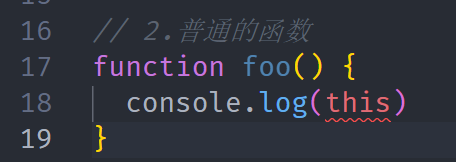
在设置了 noImplicitThis 为 true 时, TypeScript 会根据上下文推导 this,但是在不能正确推导时,就会报错,需要我们明确
的指定 this
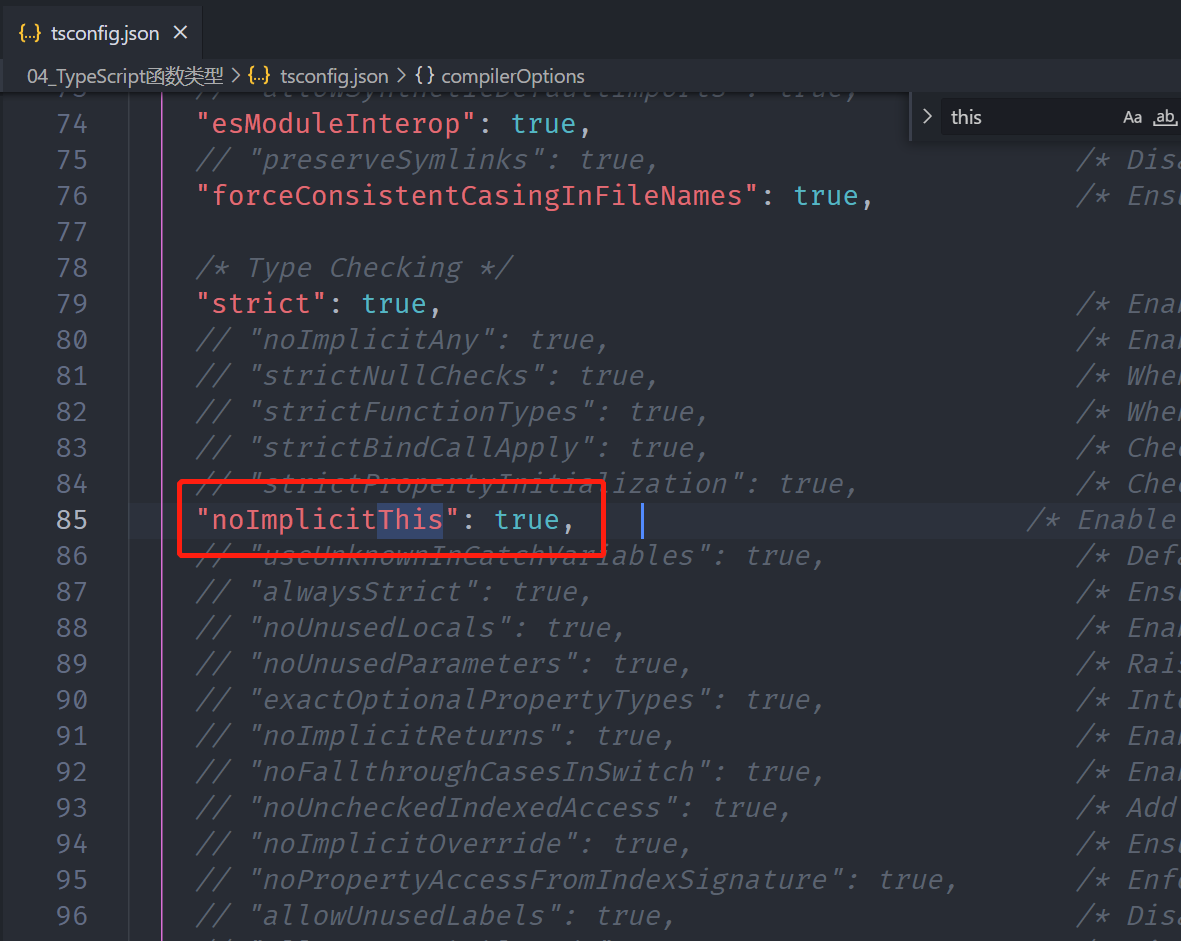
在设置了 noImplicitThis 为 true 时, TypeScript 会根据上下文推导 this,但是在不能正确推导时,就会报错,需要我们明确
的指定 this
指定 this 的类型
在开启 noImplicitThis 的情况下,我们必须指定 this 的类型
如何指定呢?函数的第一个参数类型:
- 函数的第一个参数我们可以根据该函数之后被调用的情况,用于声明 this 的类型(名词必须叫 this)
- 在后续调用函数传入参数时,从第二个参数开始传递的,this 参数会在编译后被抹除
ts
// 在设置配置选项(编译选项compilerOptions, noImplicitThis设置为true, 不允许模糊的this存在)

// 1.对象中的函数中的this
const obj = {
  name: "why",
  studying: function (this: {}) {
    // 默认情况下, this是any类型
    console.log(this, "studying");
  },
};

// obj.studying()
obj.studying.call({});

// 2.普通的函数
function foo(this: { name: string }, info: { name: string }) {
  console.log(this, info);
}

foo.call({ name: "why" }, { name: "kobe" });
this 相关的内置工具
Typescript 提供了一些工具类型来辅助进行常见的类型转换,这些类型全局可用
ThisParameterType:
用于提取一个函数类型 Type 的 this (opens new window)参数类型
如果这个函数类型没有 this 参数返回 unknown
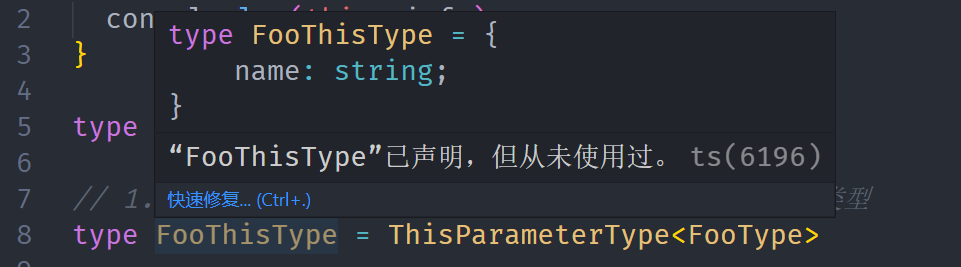
OmitThisParameter:
用于移除一个函数类型 Type 的 this 参数类型, 并且返回当前的函数类型
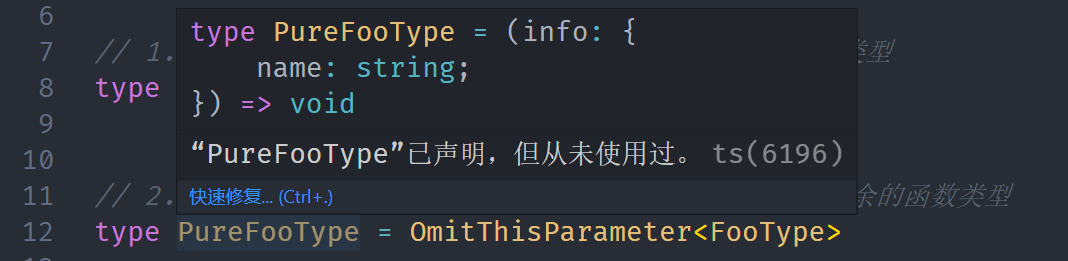
ts
function foo(this: { name: string }, info: { name: string }) {
  console.log(this, info);
}

type FooType = typeof foo;

// 1.ThisParameterType: 获取FooType类型中this的类型
type FooThisType = ThisParameterType<FooType>;

// 2.OmitOmitThisParameter: 删除this参数类型, 剩余的函数类型
type PureFooType = OmitThisParameter<FooType>;
this 相关的内置工具 - ThisType
这个类型不返回一个转换过的类型,它被用作标记一个上下文的 this 类型。(官方文档)
事实上官方文档的不管是解释,还是案例都没有说明出来 ThisType 类型的作用
我这里用另外一个例子来给大家进行说明:
ts
// 3.ThisType: 用于绑定一个上下文的this
interface IState {
  name: string;
  age: number;
}

interface IStore {
  state: IState;
  eating: () => void;
  running: () => void;
}

const store: IStore & ThisType<IState> = {
  state: {
    name: "why",
    age: 18,
  },
  eating: function () {
    // 正常情况是要this.state.name才能拿到state里面的name属性,但是如果想this.name就能拿到
    // 可以使用ThisType将store的this指向IState
    console.log(this.name);
  },
  running: function () {
    console.log(this.name);
  },
};

store.eating.call(store.state);