Appearance
Webpack 和 Tapable
我们知道 webpack 有两个非常重要的类:Compiler 和 Compilation
他们通过注入插件的方式,来监听 webpack 的所有生命周期;
插件的注入离不开各种各样的 Hook,而他们的 Hook 是如何得到的呢?
其实是创建了 Tapable 库中的各种 Hook 的实例;
所以,如果我们想要学习自定义插件,最好先了解一个库:Tapable
Tapable 是官方编写和维护的一个库;
Tapable 是管理着需要的 Hook,这些 Hook 可以被应用到我们的插件中;
Tapable 有哪些 Hook 呢?
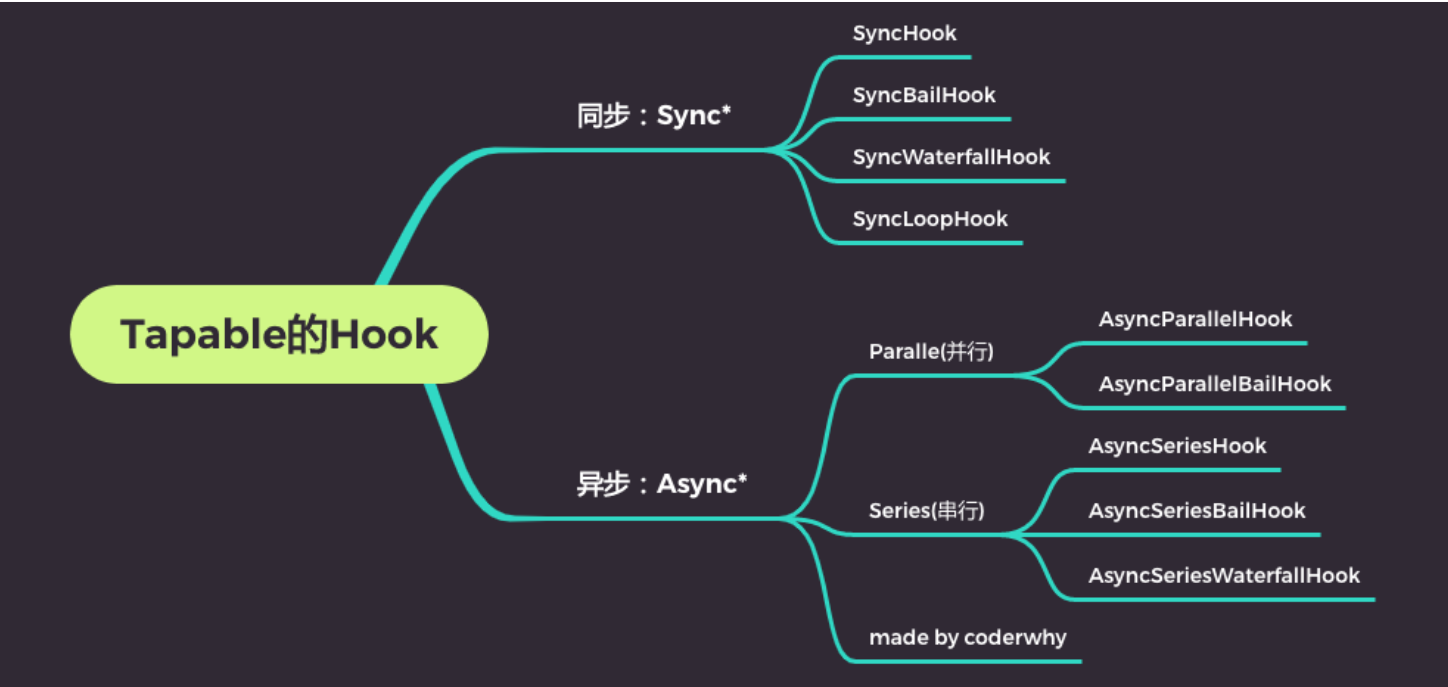
Tapable 的 Hook 分类
同步和异步的:
以 sync 开头的,是同步的 Hook;
以 async 开头的,两个事件处理回调,不会等待上一次处理回调结束后再执行下一次回调;
其他的类别
- bail:当有返回值时,就不会执行后续的事件触发了;
- Loop:当返回值为 true,就会反复执行该事件,当返回值为 undefined 或者不返回内容,就退出事件;
- Waterfall:当返回值不为 undefined 时,会将这次返回的结果作为下次事件的第一个参数;
- Parallel:并行,会同时执行次事件处理回调结束,才执行下一次事件处理回调;
- Series:串行,会等待上一是异步的 Hook;
Hook 的使用过程
第一步:创建 Hook 对象

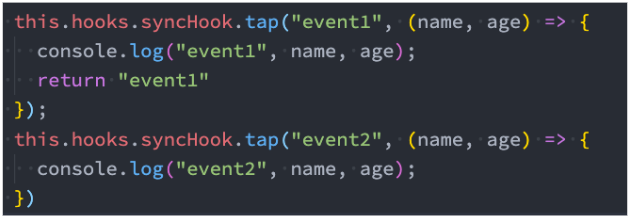
第二步:注册 Hook 中的事件
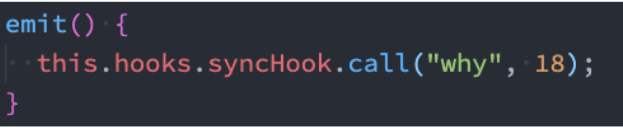
第三步:触发事件
javascript
const {
  SyncHook,
  SyncBailHook,
  SyncLoopHook,
  SyncWaterfallHook,
} = require("tapable");
const { AsyncSeriesHook, AsyncParallelHook } = require("tapable");

let counter = 0;

class HYLearnTapable {
  constructor() {
    this.hooks = {
      // syncHook: new SyncHook(["name", "age"])
      // bail: 在某一个事件监听的函数中, 如果有返回值, 那么后续的监听的事件就不会执行了
      // syncHook: new SyncBailHook(["name", "age"])
      // loop:在某个时间监听的函数中, 如果返回值为true, 那么这个回调函数就会循环执行.(返回undefined, 就停止执行)
      // syncHook: new SyncLoopHook(["name", "age"])
      // waterfall: 在某个时间监听的函数中, 如果有返回值, 那么它的返回值会作为下一次事件监听函数的第一个参数
      syncHook: new SyncWaterfallHook(["name", "age"]),

      // series: 在一个hook中, 监听了多次事件(多个回调函数), 这两个回调函数是串行执行
      asyncHook: new AsyncSeriesHook(["name", "age"]),

      // parallel: 在一个hook中, 监听了多次事件(多个回调函数), 这两个回调函数是并行执行
      // asyncHook: new AsyncParallelHook(["name", "age"])
    };

    // this.hooks.syncHook.tap("event1", (name, age) => {
    //   console.log("event1", name, age);
    //   return "event1";
    // });

    // this.hooks.syncHook.tap("event2", (name, age) => {
    //   console.log("event2", name, age);
    // });

    // this.hooks.asyncHook.tapAsync("event1", (name, age, callback) => {
    //   setTimeout(() => {
    //     console.log("event1", name, age);
    //     callback();
    //   }, 2000);
    // });

    // this.hooks.asyncHook.tapAsync("event2", (name, age, callback) => {
    //   setTimeout(() => {
    //     console.log("event2", name, age);
    //     callback();
    //   }, 2000);
    // });

    this.hooks.asyncHook.tapPromise("event1", (name, age) => {
      return new Promise((resolve, reject) => {
        setTimeout(() => {
          console.log("event1", name, age);
          resolve();
        }, 2000);
      });
    });

    this.hooks.asyncHook.tapPromise("event2", (name, age) => {
      return new Promise((resolve, reject) => {
        setTimeout(() => {
          console.log("event2", name, age);
          resolve();
        }, 2000);
      });
    });
  }

  emit() {
    // this.hooks.syncHook.call("why", 18);

    // this.hooks.asyncHook.callAsync("kobe", 30, () => {
    //   console.log("第一次事件执行完成");
    // });

    this.hooks.asyncHook.promise("james", 33).then(() => {
      console.log("事件监听完成");
    });
  }
}

const lt = new HYLearnTapable();
lt.emit();
自定义 Plugin
在之前的学习中,我们已经使用了非常多的 Plugin:
- CleanWebpackPlugin
- HTMLWebpackPlugin
- MiniCSSExtractPlugin
- CompressionPlugin
- 等等
这些 Plugin 是如何被注册到 webpack 的生命周期中的呢?
第一:在 webpack 函数的 createCompiler 方法中,注册了所有的插件;
第二:在注册插件时,会调用插件函数或者插件对象的 apply 方法;
第三:插件方法会接收 compiler 对象,我们可以通过 compiler 对象来注册 Hook 的事件;
第四:某些插件也会传入一个 compilation 的对象,我们也可以监听 compilation 的 Hook 事件;
开发自己的插件
如何开发自己的插件呢?
目前大部分插件都可以在社区中找到,但是推荐尽量使用在维护,并且经过社区验证的;
这里我们开发一个自己的简单插件:将静态文件自动上传服务器中;
自定义插件的过程:
创建 AutoUploadWebpackPlugin 类;
编写 apply 方法:
- 通过 ssh 连接服务器;
- 删除服务器原来的文件夹;
- 上传文件夹中的内容;
在 webpack 的 plugins 中,使用 AutoUploadWebpackPlugin 类;
webpack.config.js
javascript
const path = require("path");
const HtmlWebpackPlugin = require("html-webpack-plugin");
const AutoUploadPlugin = require("./plugins/AutoUploadPlugin");

module.exports = {
  entry: "./src/main.js",
  output: {
    path: path.resolve(__dirname, "./build"),
    filename: "bundle.js",
  },
  plugins: [
    new HtmlWebpackPlugin(),
    new AutoUploadPlugin({
      host: "123.207.32.32",
      username: "root",
      password: "",
      removePath: "/root/test",
    }),
  ],
};
plugins/AutoUploadPlugin.js
javascript
const { NodeSSH } = require("node-ssh");

class AutoUploadPlugin {
  constructor(options) {
    this.ssh = new NodeSSH();
    this.options = options;
  }

  apply(compiler) {
    compiler.hooks.afterEmit.tapAsync(
      "AutoUploadPlugin",
      async (compilation, callback) => {
        // 1.获取输出的文件夹
        const outputPath = compilation.outputOptions.path;

        // 2.连接服务器(ssh连接)
        await this.connectServer();

        // 3.删除原来目录中的内容
        const serverDir = this.options.remotePath;
        await this.ssh.execCommand(`rm -rf ${serverDir}/*`);

        // 4.上传文件到服务器(ssh连接)
        await this.uploadFiles(outputPath, serverDir);

        // 5.关闭ssh
        this.ssh.dispose();

        callback();
      }
    );
  }

  async connectServer() {
    await this.ssh.connect({
      host: this.options.host,
      username: this.options.username,
      password: this.options.password,
    });

    console.log("连接成功~");
  }

  async uploadFiles(localPath, remotePath) {
    const status = await this.ssh.putDirectory(localPath, remotePath, {
      recursive: true,
      concurrency: 10,
    });
    console.log("传送到服务器: ", status ? "成功" : "失败");
  }
}

module.exports = AutoUploadPlugin;